At the first use of Wii Remote, you have to do a setup (pairing) your computer using [RVL Enabler] or [Bluetoot Setup Assistant] as below:
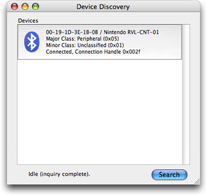
Using RVL Enabler
1. Download RVL Enabler.
2. Launch RVL Enabler.
3. Click [Search] button.
4. Push [Sync] button of Wii Remote.
5. You will see [Nintendo RVL-CNT-01] item in the list.
6. Quit RVL Enabler.
Using Bluetooth Setup Assistant
1. Open [System Preference].
2. Choose [Bluetooth].
3. Choose [Devices] tab.
4. Click [Set Up New Device…] button.
You will see [Bluetooth Setup Assistant] application.
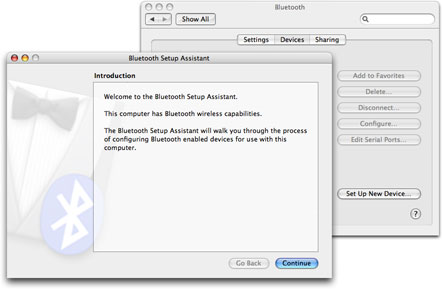
5. Click [Continue] button.
6. Choose [Any Device] and click [Continue] button.
7. Push [Sync] button of Wii Remote.
8. Choose [Nintendo RVL-CNT-01] in the list.
9. Click [Passkey Options…] button.
10. Choose [Do not use a passkey with this device] and click [OK] button.
11. Click [Continue] button.
12. If you see the message [Gathering additional information complete.], click [Continue] button.
13. You see the message [Congratulation! Your computer is now set up to use your Bluetooth device] and then click [Quit] button to terminate [Bluetooth Setup Assistant]application.
You can use Wii Remote now.
Thanks for the great article This is exactly the thing I needed to see
Hello,
how can I use the WII Remote to get the Position data ( from right side “p ir” ) I have a set of Nintendo game play station, it should be contained Sensor bar, right?
thanks for any instruction
Shing-kwei
Sometimes the problem can be solved by switching off the console. I will suggest you to switch off for twenty to 30 minutes very first. The thought right here is that the console may well just be overheat. The problem might be solved itself when the console cools down. When you have switched off the PS3, you can also check the cables to make sure that they are linked properly. You could also want to consider the hard drive out to place it back again again.
Learn more PS3 tips
ピンバック: aka.wiirmote FAQ « akalogue