できました。IRセンサーに関しては、ひとつのセンサーバー(じゃなくってロウソク)を共用することも、別々のセンサーバーを使うこともできますね。この調子だと4本でも5本でも大丈夫そうです。Bluetoothの規格上は何台までかな?
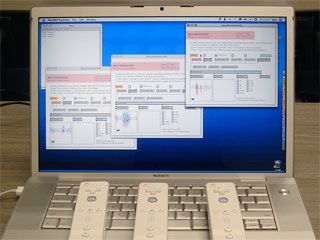
できました。IRセンサーに関しては、ひとつのセンサーバー(じゃなくってロウソク)を共用することも、別々のセンサーバーを使うこともできますね。この調子だと4本でも5本でも大丈夫そうです。Bluetoothの規格上は何台までかな?
新しいバージョンのaka.wiiremoteをアップロードしました。
このバージョンから複数台のWiiリモコンをサポートしています。少なくとも2台は大丈夫ですけど、何台まで大丈夫かは不明….
PowerPC-Macでの動作不安定は解消されていませんね。ただ、毎回「Bluetooth設定アシスタント」で設定を行えば安定しているようです。Intel-Macでは1度だけ設定すれば、後は何もしなくてもちゃんと動作するんですけどね。何が違うのだろう??
普段使っているコンピュータとは別のコンピュータでWiiリモコンを使おうとして気がついたのですが、最初にWiiリモコンを使う場合には「Bluetooth設定アシスタント」を使って、Wiiリモコンをそのコンピュータで使えるように設定する必要があるようです。たぶん…
私の場合、最初にHIDデバイス+hiオブジェクトとしてWiiリモコンを使おうとしたので、その時に設定をしていたんだと思います。しかし、その後はそのことに忘れていて、特に言及していませんでした。なので、新しく設定に関する記事を書いてFAQからリンクした次第です。
この設定は最初に一度だけすれば、同じコンピュータを使う限り、2回目からは設定する必要はないと思います。
これからWiiリモコンを使う人は、「Bluetooth設定アシスタント」で設定する前にオブジェクトが使えるか?設定をした後にオブジェクトが使えるか?をレポートしていただけると有り難いです。
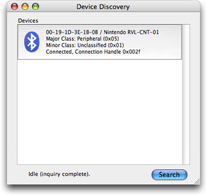
At the first use of Wii Remote, you have to do a setup (pairing) your computer using [RVL Enabler] or [Bluetoot Setup Assistant] as below:
1. Download RVL Enabler.
2. Launch RVL Enabler.
3. Click [Search] button.
4. Push [Sync] button of Wii Remote.
5. You will see [Nintendo RVL-CNT-01] item in the list.
6. Quit RVL Enabler.
1. Open [System Preference].
2. Choose [Bluetooth].
3. Choose [Devices] tab.
4. Click [Set Up New Device…] button.
You will see [Bluetooth Setup Assistant] application.
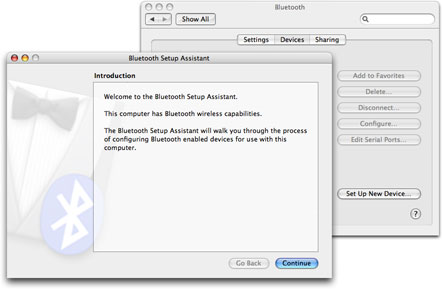
5. Click [Continue] button.
6. Choose [Any Device] and click [Continue] button.
7. Push [Sync] button of Wii Remote.
8. Choose [Nintendo RVL-CNT-01] in the list.
9. Click [Passkey Options…] button.
10. Choose [Do not use a passkey with this device] and click [OK] button.
11. Click [Continue] button.
12. If you see the message [Gathering additional information complete.], click [Continue] button.
13. You see the message [Congratulation! Your computer is now set up to use your Bluetooth device] and then click [Quit] button to terminate [Bluetooth Setup Assistant]application.
You can use Wii Remote now.
コンピュータを使って初めてWiiリモコンを使用する場合、以下の手順のように、「RVL Enabler」または「Bluetooth設定アシスタント」を使ってWiiリモコンをコンピュータで使用できるように設定(ペアリング)します。
1. RVL Enablerをダウンロードする。
2. RVL Enablerを起動する。
3. 「Search」ボタンをクリックする。
4. WiiリモコンのSyncボタンを押す。
5. リストに「Nintendo RVL-CNT-01」という項目が表示されれば設定完了。
6. RVL Enablerを終了する。
1. システム環境設定を開く。
2. 「Bluetooth」を選ぶ。
3. 「デバイス」タブを開く。
4. 「新規デバイスを設定…」ボタンをクリックする。
Bluetooth設定アシスタントが開く。
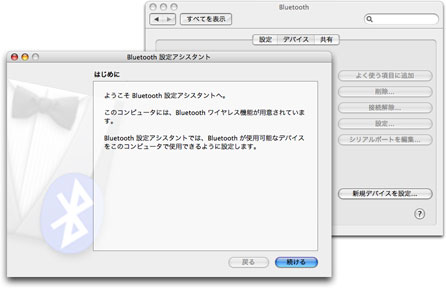
5. 「続けるボタン」をクリックする。
6. 「任意のデバイス」を選び、「続ける」ボタンをクリックする。
7. WiiリモコンのSyncボタンを押す。
8. リストに表示された「Nintendo RVL-CNT-01」を選択する。
9. 「パスキーオプション…」ボタンをクリックする。
10. 「このデバイスではパスキーを使用しない」を選び、「OK」ボタンをクリックする。
11. 「続ける」ボタンをクリックする。
12. 「追加情報の収集が完了しました。」と表示されれば、「続ける」ボタンをクリックする。
13. 「お使いのコンピュータでBluetooth デバイスが使用できるように設定されました。」と表示されるので、「終了」ボタンをクリックしてBluetooth設定アシスタントを終了する。
以上です。
学生がWiiリモコンを貸してくれたので、複数台をサポートしようと思っています。それで、取りあえず、Bluetooth Explorerというユーティリティで検出させたところ、以下のような結果になりました。
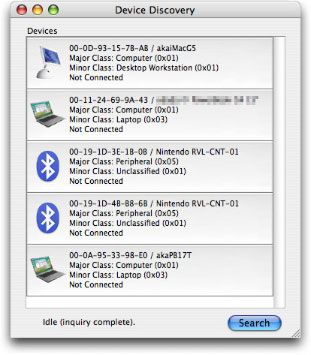
つまり、Wiiリモコンは名前では判別できないが、デバイス・アドレス(6個の数値、48ビット)で判別できる、ってことのようですね。
ちなみに、コンピュータのアイコンが古いのはご愛嬌&隣の人のマシンも検出しちゃったのでプラバシー保護のために一部モザイクをかけてます(笑)。Bluetooth ExplorerはXcode Toolsにあります。
aka.wiiremoteを1.0B3に更新しました。
このバージョンでは、
– PowerPC-Macでの安定性の改善
– データ取得の高速化(1.0B1並みに戻った)
– バイブレーション音の正常化
をしたつもりなのですが、どうでしょうか?
快調orココがダメなどレポートをいただけると有り難いです。
よくある質問(FAQ)の簡易版英文を書いたのですが、英語力低いもので下手な文章ですみません。なにかおかしな点があったら、教えてくださいませ。
日本語FAQも英語FAQもダウンロード・サイトからリンクしています。内容の更新が簡単でコメントも付けられるから、なのですが、しかし、本文は英語でも、このタイトではそれ以外のメニューやボタンは日本語なので、英語の人は困っちゃうよね。バイリンガル表示が簡単なCMSって何がいいんですかね?
Q Do I need the Wii Console ?
A: No. You need the Wii Remote (a.k.a. Wiimote) and the Macintosh computer with Bluetooth. You also need the Sensor Bar (power-supplied by yourself) if you use IR-sensor. You can use two IR-transmitters or two candles instead of the Sensor Bar .
Q: Can I use two Wiimotes ?
A: You can use multiple Wiimotes in 1.0B4 and later. I could connect five Wiimotes to one computer at a time. I have used eighteen Wiimotes with four computers.
Q: Does it support Nunchuk and Classic Controller ?
A: Nunchuk is supported in 1.0B5. Classic Controller is supported in 1.0B6.
Q: The object is not created (dimmed).
A: Please note that you have to run it under the latest Mac OS X (10.4.8 and later) and Max (4.6.2 and later). The Bluetooth framework version should be 1.6.3 and later.
Q: I cannot connect the object to my Wiimote.
A: You have to setup Wii Remote for use with your computer using [RVL Enabler] or [Bluetooth Setup Assistant] for the first time.
Q: Does it run on Intel-Mac and PowerPC-Mac ?
A: Yes. It is a universal binary Mach-O object. I checked it with my MacBook Pro and PowerBook G4, both with internal Bluetooth device. I also checked it with my PowerMac G5(2.5GHz/Quad) and D-Link DBT-120 Bluetooth-USB Adapter.
Q: Is it buggy on PowerBook G4 ?
A: Sure. It is unstable and some functions does not work fine on PowerBook G4. In my experience, I had a good result if I do the following steps every time I use it on PowerBook G4. (You would set up only once on Intel-Mac.)
1: Delete “Nintendo RVL-CNT-01” on “Device” tab in “Bluetooth” System Preference.
2: Do the setup for Wii Remote.
3: Open “aka.wiiremote.help” and connect it.
Q: Can I use the Wiimote that is sold outside Japan ?
A: Yes. I believe the Wiimotes are same in the world.
Q: What is the Sync button that is mentioned in the help patch ?
A: A small red button inside the Wiimote battery box. You can also push 1 and 2 buttons simultaneously to start the synchronization.
Q: The sound of vibration is a little unusual.
A: It was fixed in 1.0B3, I believe.
Q: Do you have the object for Windows and CFM ?
A: No. But I published my source code. So I hope someone would port it to them.
Q: Can I modify your source code and publish another version of the object ?
A: Yes. You can modify and publish it under the BSD license described in COPYRIGHT.txt in the distribution.
Q: What is the difference of DarwiinRemote and aka.wiiremote in source codes ?
A: I made it referring to the source code of WiiRemote Framework 0.4. But they are not same because of the difference of APIs and programming languages.
Q: What is the difference of DarwiinRemote and aka.wiiremote actually ?
A: DarwiinRemote is an application software and aka.wiiremote is a Max object apparently. aka.wiiremote provides raw informations from Wiimote and has no practical function. Thus you would make your own patch by yourself.
MaxMSP-MLにも流しているせいか、このサイト以外での問い合わせなどもいくつかあって、現時点でのFAQをちょこっと書いておきます。
Q: Wii本体(Wii Console)が必要か?
A: Wii本体は必要ありません。Wiiリモコンだけで動作します。コンピュータにはBluetooth機能が必要です。IRセンサーを利用するにはセンサーバーが必要ですが、センサーバーへ独自に電源を供給する必要がありそうです。センサーバーの代わりに、2個の赤外線投射器や2本のロウソクを使うこともできます。
Q: 2本のWiiリモコンを利用できるか?
A: バージョン1.0B4で複数のWiiリモコンの接続に対応しました。1台のコンピュータには5台までのWiiリモコンを同時に接続できるようです。従って、18台のWiiリモコンを用いるためには、4台のコンピュータが必要でした。
Q: ヌンチャクやクラシック・コントローラに対応しているか?
A: バージョン1.0B5でヌンチャクをサポートしました。クラシック・コントローラはバージョン1.0B6でサポートされました。
Q: オブジェクトが生成されない(点線表示される)。
A: 最新のMac OS X(10.4.8以降)と最新のMax(4.6.2以降)を使用してください。それ以前のバージョンでは動作しない場合があります。ちなみに、システムプロファイラで確認して、Bluetoothソフトウェアのバージョンが1.6.3以降であれば動作するハズです。
Q: connectメッセージを送っても接続できない。
A: コンピュータを使って初めてWiiリモコンを使用する場合、「RVL Enabler」または「Bluetooth設定アシスタント」を使ってWiiリモコンが使用できるように設定します。
Q: Intel MacでもPowerPC Macでも動作するのか?
A: aka.wiiremoteはMach-O形式のユニバーサル・バイナリー・オブジェクトなので、どちらでも動作します。MacBook ProとPowerBook G4で内蔵Bluetoohを使って動作確認しています。また、PowerMac G5(2.5GHz Quad)とD-Link社のDBT-120 Bluetooth-USBアダプタを使っても動作確認しています。それ以外のサード・パーティ製のBluetoothアダプタでの動作は確かめていません。動作確認された方がいらっしゃれば、教えてください。
Q: PowerBook G4での動作がおかしいのでは?
A: PowerBook G4では一部動作が不良です。私の経験では、PowerBook G4で使用する場合、毎回次の手順で設定を行なうことで、接続がうまくいくようでした。Intel-Macでは設定は1度だけ行なえば大丈夫です。
1:「Bluetooh」環境設定の「デバイス」タブに「Nintendo RVL-CNT-01」があれば、削除する。
2: Wiiリモコンが使用できるように設定する。
3:「aka.wiiremote.help」を開き、接続を行なう。
Q: 海外で販売されているWiiリモコンでも使えるのか?
A: 使えると思います。海外のユーザが現地で購入したWiiリモコンで使用できたとの報告を、いくつかもらっています。
Q: ヘルプ・パッチに書かれているWiiリモコンのSyncボタンとは何か?
A: Wiiリモコンの裏側の蓋を開けて、電池の横にある小さな赤いボタンのことです。リモコン表面の「1」と「2」のボタンを押すことでも良いようですが、赤いボタンのほうが確実であるような気がします。これら2つの違いって何ですかね? 本体や説明書を持っていないので分からない(笑)。
Q: バイブレーションの音が変です。
A: 1.0B1では正常ですが、1.0B2で動作不良がありました。1.0B3で解決されています。
Q: WindowsやCFM用のオブジェクトはあるか?
A: ありません。ただし、ソースコードを公開しているので、他の動作環境に移植していただいて構いません。ちなみに、ある人がPd用に移植を始めたそうです。現時点でコンパイルはできたが、動作不良とか。
Q: ソースコードを修正して、異なるバージョンを作っても良いか?
A: COPYRIGHT.txtに書いたように、このソフトウェアはBSDライセンスです。このライセンスに従って修正や配布をしてください。
Q: DarwiinRemoteとaka.wiiremoteとのソースコードの互換性は?
A: aka.wiiremote 1.0B5はWiiRemoteFramework 0.4のソースコードを参考にしていますが、APIや開発言語の違いもあって同一とは言えません。今後はフレームワークをそのまま取り込むことも考えられますが、未定です。
Q: DarwiinRemoteとaka.wiiremoteとの違いは?
A: アプリケーションとMaxオブジェクトです、と言えばそれまでですが、aka.wiiremoteはより多くの情報を出力するようになっています。一方で、aka.wiiremote自体は生データに近い情報を出力するので、その利用はユーザに任せられています。例えば、ヘルプ・パッチでのグラフ表示やボタン表示がそうです。
ってなとこですかね? 他にも何かあれば、このブログに書いてくださいませ。適時更新します。